There are no items in your cart
Add More
Add More
| Item Details | Price | ||
|---|---|---|---|

We introduce the problem, build intuition about the core mechanism, diagram the architecture, then dissect each domain systematically before landing on exam strategy.
The CKA exam tests whether you can operate that control system under pressure. Not just recite concepts actually fix a broken cluster, schedule workloads, configure networking, and reason about failures in real time.
The Core Pattern: Desired State vs. Actual State
Every concept in Kubernetes flows from a single idea: you declare what you want, and Kubernetes reconciles reality toward it. You write a manifest. You submit it to the API server. A controller watches that object, compares desired state to actual state, and takes action to close the gap. This loop never stops. That's the reconciliation pattern and it explains everything from Deployments to PersistentVolumeClaims to NetworkPolicies.
Architecture: How the Cluster Is Structured
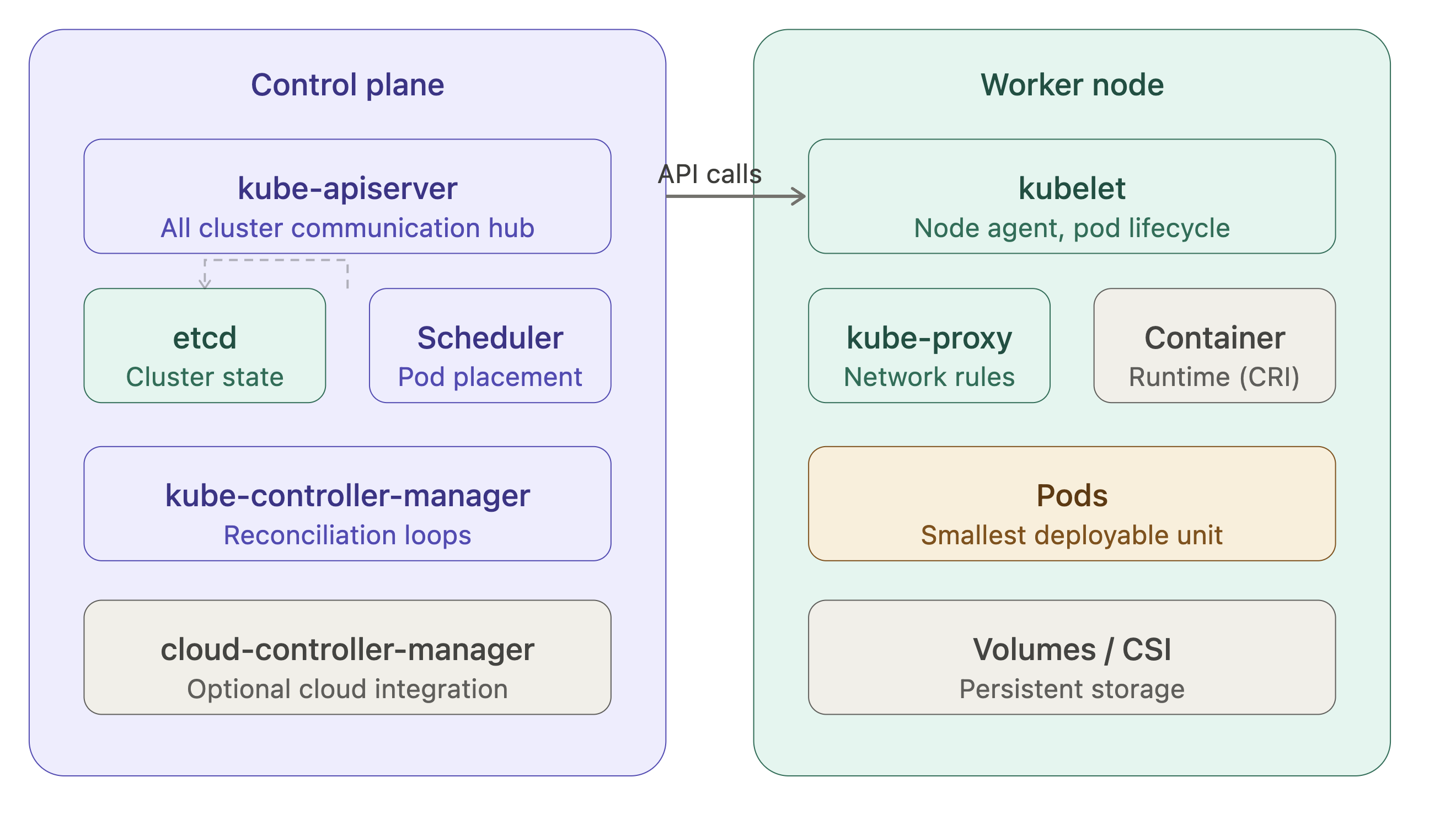
The diagram above shows the two-tier architecture of every Kubernetes cluster. The control plane manages cluster-wide state; worker nodes run your actual workloads. Here's what each component does and why it exists.
• kube-apiserver is the single entry point for all cluster operations. Every kubectl command, every controller's watch loop, every kubelet heartbeat all of it goes through the API server. It performs authentication, authorization (RBAC), and admission control before persisting any object to etcd. In v1.35, the API server continues to serve the stable v1 and apps/v1 groups for core workloads.
• etcd is a distributed key-value store that holds the entire cluster state. It's the source of truth. If etcd is healthy, the cluster can be recovered. If etcd is corrupted or lost and you have no backup, the cluster is gone. The CKA exam heavily tests etcd backup (etcdctl snapshot save) and restore procedures.
• kube-scheduler watches for newly created Pods with no assigned node, then selects a node based on resource requests, affinity/anti-affinity rules, taints, tolerations, and topology spread constraints. In v1.35, the scheduler uses the NodeAffinity, TaintToleration, and PodTopologySpread plugins in the scheduling framework.
• kube-controller-manager is a collection of control loops the Deployment controller, ReplicaSet controller, Node controller, Endpoints controller, and many others bundled into a single binary. Each loop watches a specific resource type and reconciles actual state to desired state.
• kubelet runs on every worker node. It receives PodSpecs from the API server (via a watch), ensures containers are running and healthy, and reports back node and pod status. It also enforces resource limits using cgroups.
• kube-proxy maintains network rules on each node to implement Service abstraction. By default it uses iptables rules; in large clusters, IPVS mode is preferred for performance.
This is the heaviest exam domain. You must be able to install a cluster with kubeadm, join worker nodes, upgrade a cluster in place, and configure RBAC.
• kubeadm workflow follows a clear sequence. First, kubeadm init initializes the control plane it generates a self-signed CA, creates kubeconfig files in /etc/kubernetes/, deploys static Pods for apiserver, controller-manager, and scheduler under /etc/kubernetes/manifests/, and bootstraps etcd. Worker nodes join with kubeadm join using a token and the CA certificate hash. The kubelet on each node is already expected to be running as a systemd service.
• Cluster upgrades with kubeadm follow a strict sequence: upgrade the control plane first, then drain each worker node and upgrade kubelet and kubectl on each one. The process for v1.35 follows the standard kubeadm upgrade apply v1.35.x path. You cannot skip minor versions each upgrade can only go one minor version at a time.
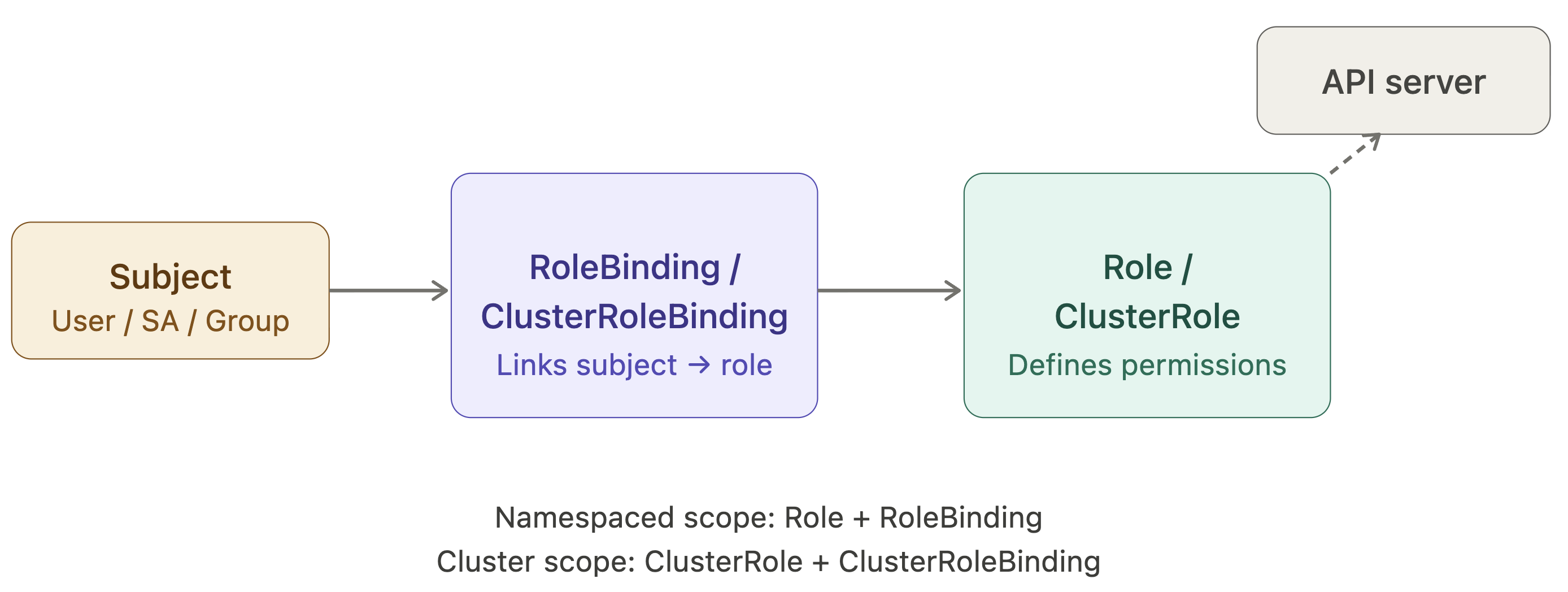
• RBAC is the authorization model for the API server. There are four object types: Role and ClusterRole (define permissions), RoleBinding and ClusterRoleBinding (assign permissions to subjects). A Role is namespaced; a ClusterRole is cluster-scoped. The subject can be a User, Group, or ServiceAccount. For the exam, you must be able to create these with kubectl create role, kubectl create rolebinding, and verify them with kubectl auth can-i.
 Domain 2: Workloads & Scheduling (20%)
• Pod lifecycle is the foundation. A Pod transitions through Pending → Running → Succeeded / Failed. Within a Pod, containers have their own states: Waiting, Running, Terminated. The kubelet uses liveness probes to restart containers that are stuck, readiness probes to gate traffic, and startup probes to protect slow-starting apps.
• Deployments manage ReplicaSets, which manage Pods. A rolling update creates a new ReplicaSet and scales it up while scaling the old one down. The maxUnavailable and maxSurge fields control the rate. kubectl rollout undo reverts to the previous ReplicaSet. kubectl rollout history shows the revision log.
• StatefulSets are like Deployments but provide stable Pod identity each Pod gets a persistent hostname (pod-0, pod-1, ...) and its own PersistentVolumeClaim. Pods are created and deleted in strict order. This makes StatefulSets the right choice for databases, message queues, and any workload where instance identity matters.
• DaemonSets ensure exactly one Pod runs on every (or a subset of) nodes. They're the pattern for log collectors, monitoring agents, and network plugins like Calico or Cilium.
• Resource requests and limits sit at the intersection of scheduling and reliability. The scheduler uses requests to find a node with enough capacity. The kubelet uses limits to enforce them at runtime via cgroups. A container that exceeds its memory limit is OOMKilled. A container that exceeds its CPU limit is throttled, not killed. LimitRange objects set per-namespace defaults; ResourceQuota objects cap namespace-wide consumption.
Taints and tolerations allow nodes to repel Pods unless the Pod explicitly tolerates the taint. A taint has a key, value, and effect (NoSchedule, PreferNoSchedule, NoExecute). The NoExecute effect also evicts already-running Pods that lack the toleration. Node affinity provides a similar mechanism but from the Pod's perspective you express a preference or requirement for the node labels a Pod must land on.
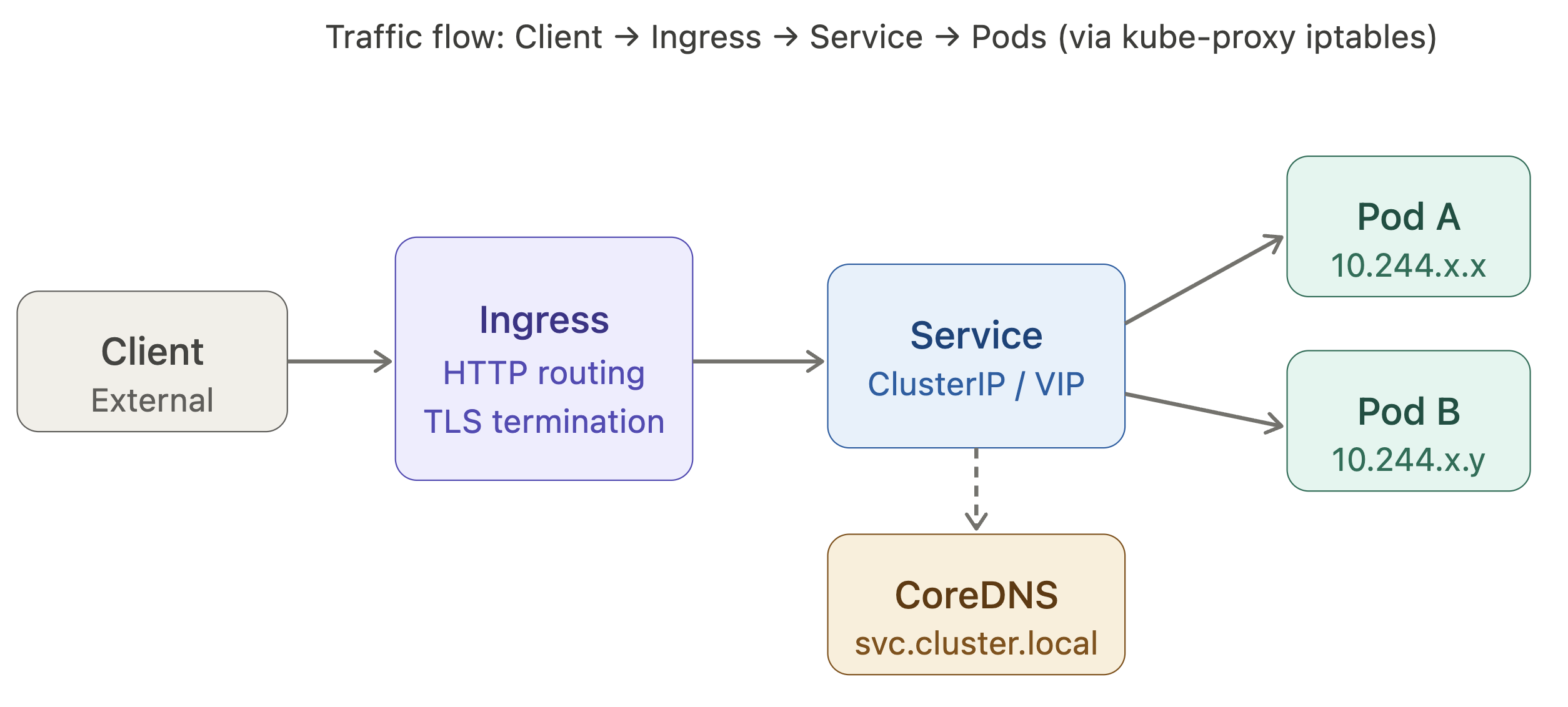
The Kubernetes network model has three invariants: every Pod gets its own IP, Pods on different nodes can communicate without NAT, and nodes can communicate with all Pods. The implementation of this model is delegated to a CNI plugin (Calico, Flannel, Cilium, etc.).
• Services provide a stable virtual IP (ClusterIP) that load-balances across the matching Pods. There are four types. ClusterIP is cluster-internal only. NodePort opens a port on every node and forwards to the service. LoadBalancer provisions a cloud load balancer in front of NodePort. ExternalName is a DNS alias to an external hostname.
• DNS is provided by CoreDNS, running as a Deployment in the kube-system namespace. Every Service gets a DNS record of the form <service>.<namespace>.svc.cluster.local. Pods can reach services in the same namespace by the bare service name; cross-namespace requires the full form.
• Ingress exposes HTTP/HTTPS routes from outside the cluster to Services inside it. An Ingress resource is just configuration an Ingress controller (nginx, traefik, etc.) is the component that actually implements the routing rules. An IngressClass ties an Ingress object to a specific controller.
Domain 4: Storage (10%)
• The PersistentVolume subsystem decouples storage provisioning from storage consumption. An administrator (or a StorageClass with dynamic provisioning) creates a PersistentVolume (PV) a piece of physical storage. A developer creates a PersistentVolumeClaim (PVC) a request for storage. Kubernetes binds the two based on access modes, capacity, and StorageClass.
• Access modes are central to understanding PV/PVC binding. ReadWriteOnce (RWO) means one node at a time can mount read-write. ReadOnlyMany (ROX) allows many nodes to mount read-only. ReadWriteMany (RWX) allows many nodes to mount read-write — only some volume types support this.
• StorageClasses enable dynamic provisioning. When a PVC references a StorageClass, a provisioner (e.g., the AWS EBS CSI driver, or rancher.io/local-path) creates a PV on demand. The reclaimPolicy on the StorageClass governs what happens to the PV when the PVC is deleted: Delete removes the underlying storage, Retain keeps it for manual cleanup.
• Volume types in v1.35 follow the Container Storage Interface (CSI). The old in-tree drivers (awsElasticBlockStore, gcePersistentDisk, etc.) are removed or deprecated in favor of their CSI counterparts. For the CKA exam, you must understand emptyDir (ephemeral, lives with the Pod), hostPath (mounts a node directory useful for debugging, dangerous in production), configMap and secret volumes, and the PV/PVC lifecycle.
Domain 5: Troubleshooting (30%)
This is the largest exam domain by weight and the one most candidates underestimate. You're expected to diagnose and fix a running cluster under time pressure.
• Node not ready is the most common failure scenario. The diagnostic sequence goes: check kubectl describe node <name> for conditions and events, check systemctl status kubelet on the node, check kubelet logs with journalctl -u kubelet -n 50, verify the node can reach the API server. Common root causes are a stopped kubelet service, a misconfigured kubelet config file, a missing CNI plugin, or certificate expiry.
• Pod stuck in Pending means the scheduler cannot find a suitable node. Reasons include: insufficient CPU/memory on all nodes, a node selector or affinity rule that matches no node, a taint with no matching toleration, or a PVC that cannot be bound. kubectl describe pod <name> and kubectl get events are your first tools.
• Pod in CrashLoopBackOff means the container is starting but exiting non-zero repeatedly. kubectl logs <pod> (and kubectl logs <pod> --previous for the last crashed instance) reveal the application error. Common causes are bad configuration, missing secrets, failed liveness probes with too-tight thresholds, or a misconfigured command/entrypoint.
• etcd backup and restore is explicitly tested. The backup command is ETCDCTL_API=3 etcdctl snapshot save /path/to/snapshot.db --endpoints=https://127.0.0.1:2379 --cacert=... --cert=... --key=.... The restore command uses etcdctl snapshot restore to a new data directory, then updates the etcd static Pod manifest to point --data-dir at the restored path. The cluster will restart etcd and load the snapshot state.
• Certificate troubleshooting with kubeadm certs check-expiration and renewal with kubeadm certs renew all are testable skills. The API server, controller-manager, scheduler, and etcd each have their own certificates under /etc/kubernetes/pki/.
The Mental Model: Think in Loops, Not Snapshots
The key insight for both operating Kubernetes and passing the CKA exam is to stop thinking about the cluster as a static system and start thinking about it as a set of nested control loops. Every object is an intent. Every controller is a reconciler. Every problem is a gap between declared intent and observed reality.
When you're troubleshooting, trace the loop backward: from the symptom (Pod not running) to the object state (Pod conditions) to the controller that manages it (kubelet, scheduler, Deployment controller) to the upstream object or external dependency that's broken. The loop model tells you exactly where to look.
Real Exam Tips
• Get very familiar with Kubectl - Deep understandingof Kubectl is essentianl for clearing CKA Exam, as the entire test is performed from through Command line.
• Get comfortable with Kubernetes Official Documentation - As you can refer official docs understand throughly which specific information is located where and How to quickly search and navigate. Being familiar with the structure of the documentation can save valuable time during the exam.
• Always verify you work - After performing each question ensure the resource is working as excepted (eg: kubectl get pods) make sure it is in running state. Ensure the are no errors like No errors like CrashLoopBackOff or ImagePullBackOff. Check that all services and configurations are applied correctly.
• Manage Time Effectively - Attempt all the easy questions first and make sure you get them right to secure your quick marks, time limit yourself for each question. If you are stuck on a single question for more than 10 minutes, skip it and move to next one. In the last 20 minutes, return to skipped question. Never leave a question completely blank.
• Copy-Paste resource names to avoid errors - Every exam question contains precise resource names, namespace names, image tags, and label values (e.g: pod-name: xyz-016455 or storage-class-cka00012). If you type these manually and make a single character error, Kubernetes will create a resource with the wrong name which can lead to incorrect answers. Copy directly from your question to terminal.
Consistent hands-on practice combined with these strategies will significantly improve your chances of clearing the exam on your first attempt.
Good Luck
Happy Learning!
Pooja Bhavani
DevOps and Cloud Engineer at TrainWithShubham