AWS DevOps CI/CD Pipeline: A Complete Implementation Guide

Introduction

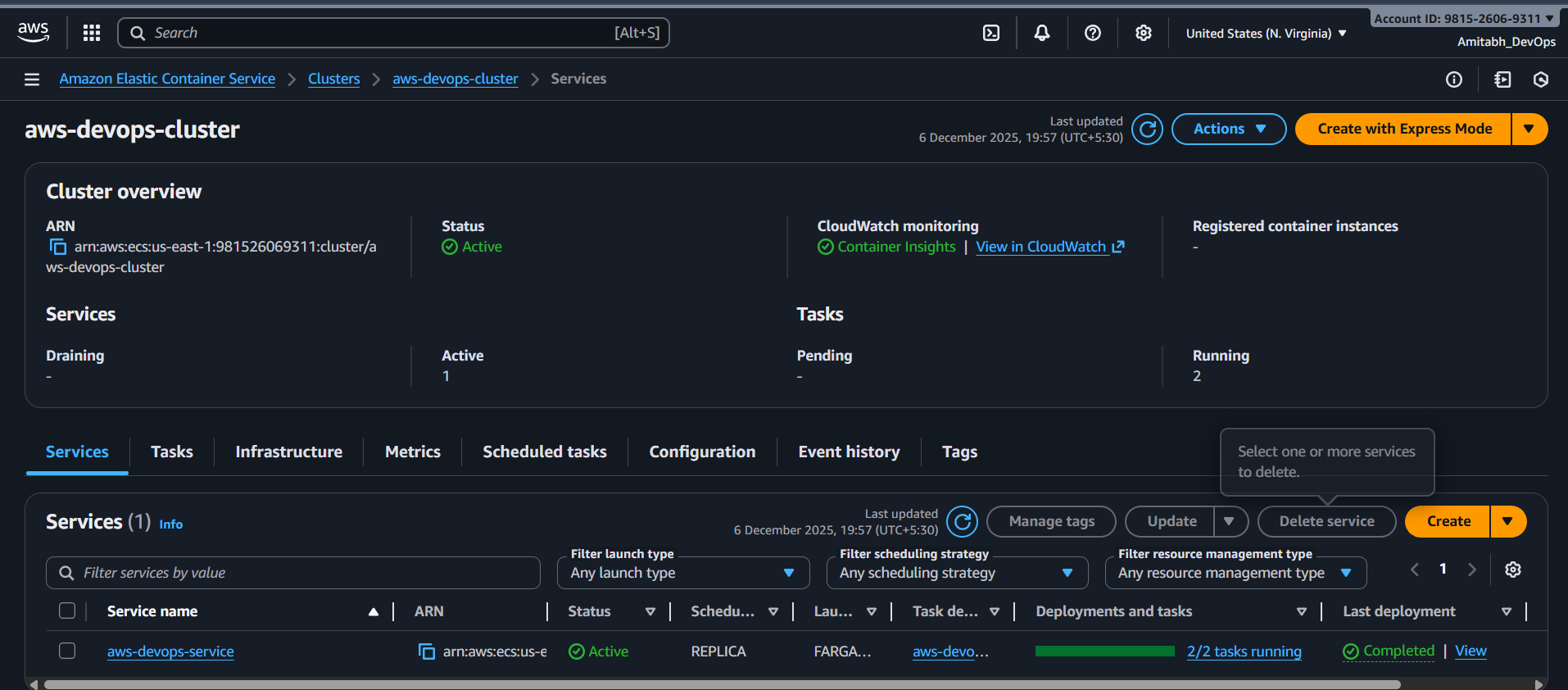
This article documents the implementation of a production-grade CI/CD pipeline on AWS using Terraform. The project demonstrates automated deployment of a containerised Node.js application using AWS ECS Fargate, with infrastructure fully managed as code. 

Project Repository: https://github.com/Amitabh-DevOps/aws-devops

What is AWS DevOps?

AWS DevOps combines development and operations using Amazon Web Services. It enables:

  • Automation: Automated infrastructure provisioning and application deployment
  • Scalability: Dynamic resource allocation based on demand
  • Reliability: High availability through multi-AZ deployments
  • Speed: Faster delivery cycles through continuous integration and deployment

Core AWS Services Used

  1. Amazon ECS: Orchestrates Docker containers
  2. AWS Fargate: Serverless compute for containers
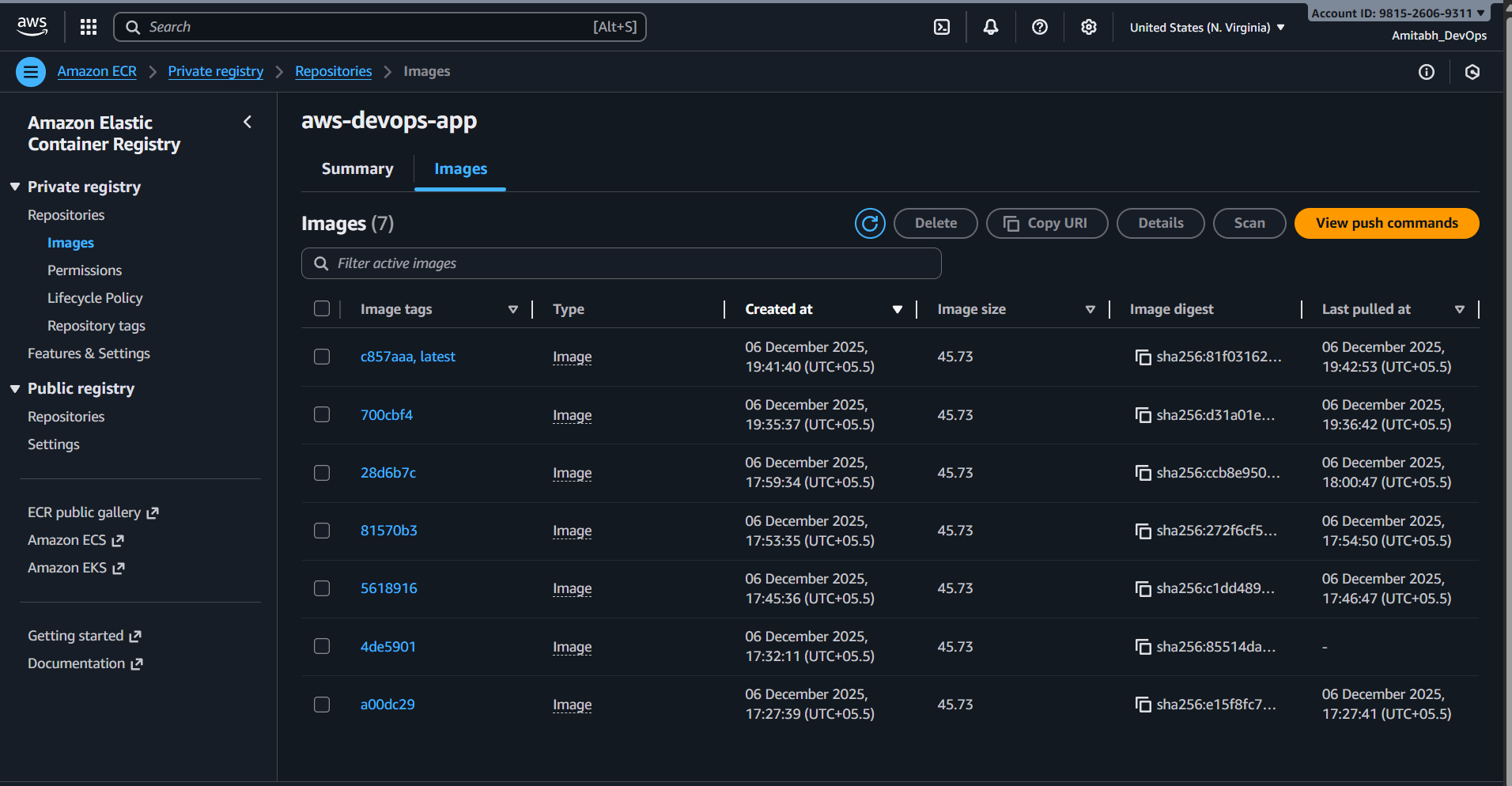
  3. Amazon ECR: Private Docker image repository
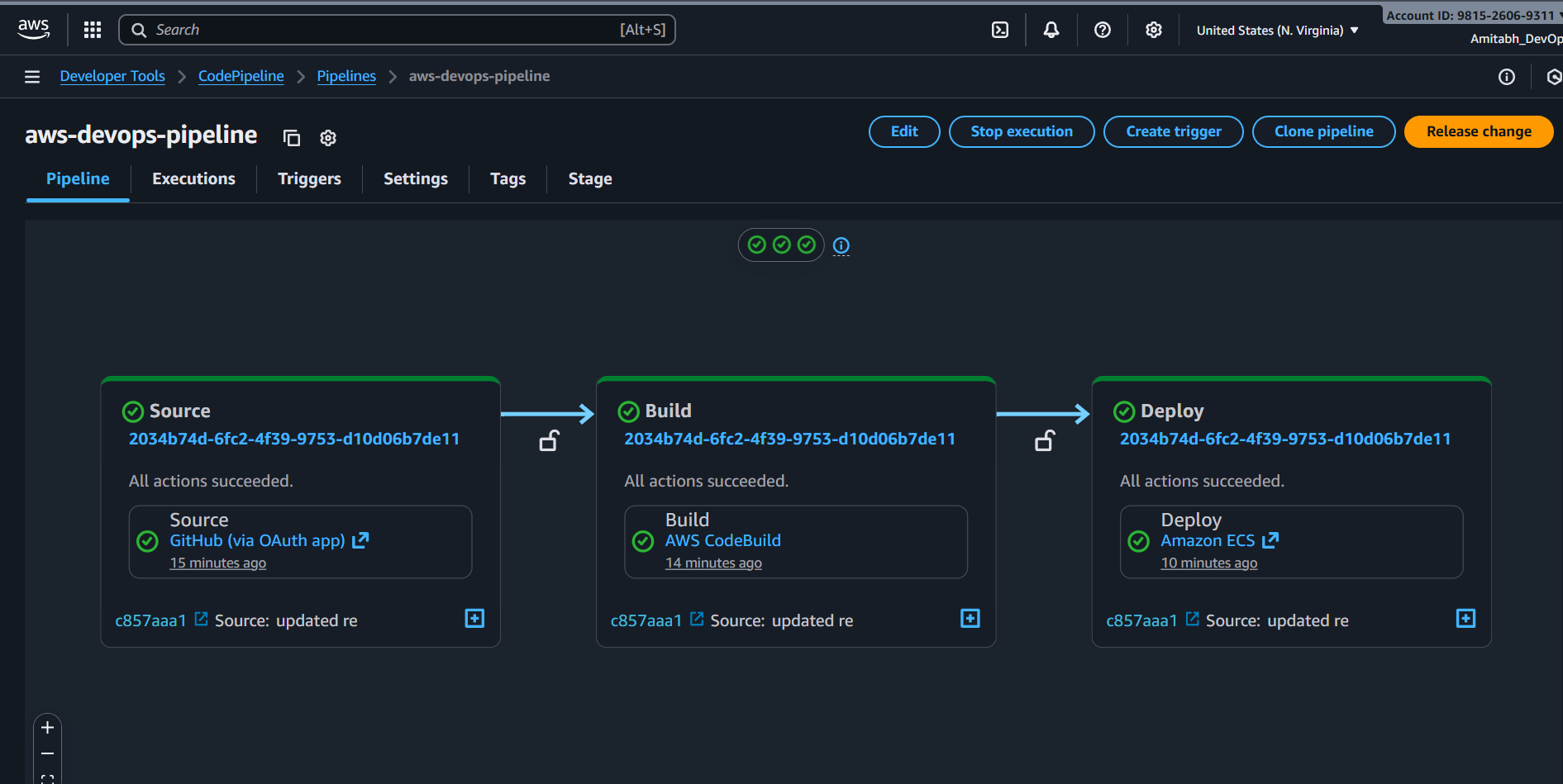
  4. AWS CodePipeline: CI/CD workflow orchestration
  5. AWS CodeBuild: Builds Docker images
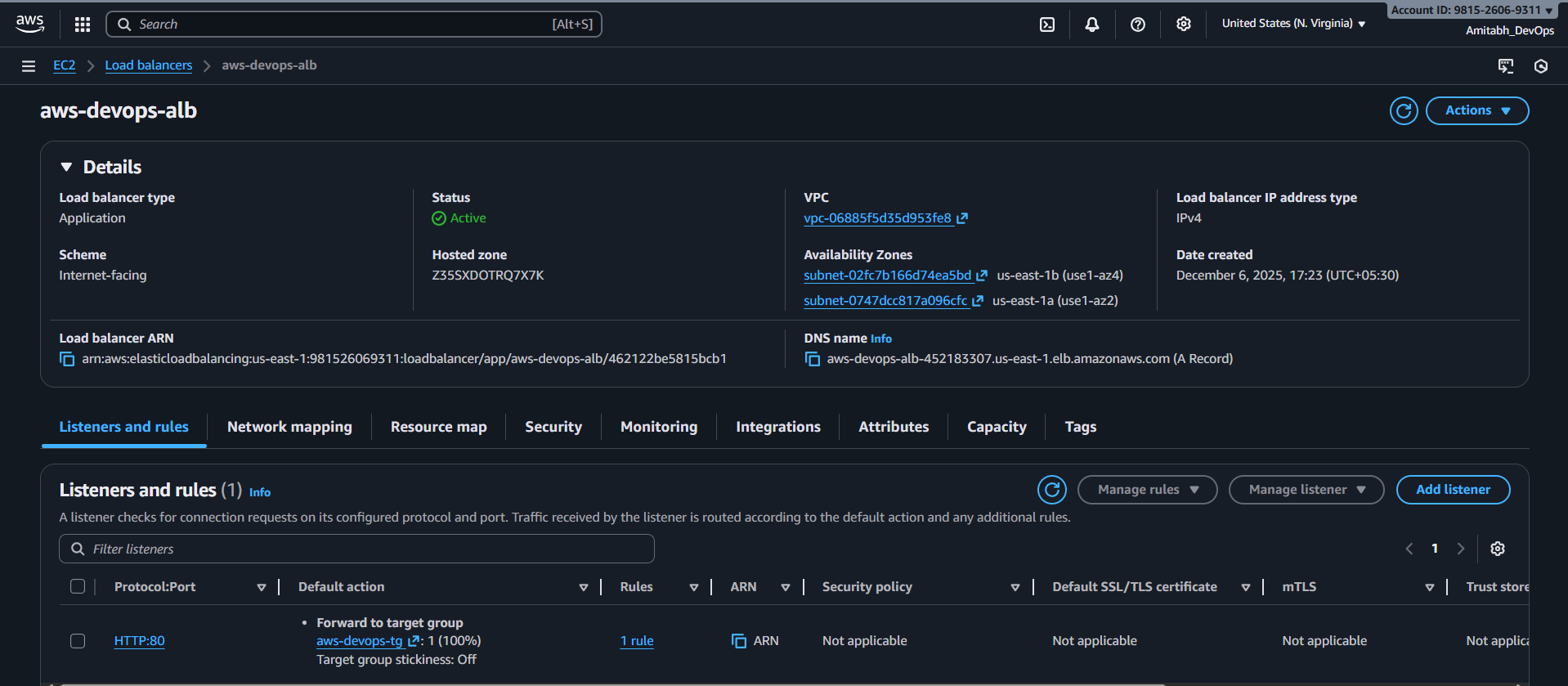
  6. Application Load Balancer: Distributes traffic
  7. Amazon VPC: Isolated network environment
  8. CloudWatch: Logging and monitoring

Understanding CI/CD

Continuous Integration (CI)

Automatically building and testing code changes:

  1. Developer pushes code to GitHub
  2. CodePipeline detects the change via webhook
  3. CodeBuild builds a Docker image
  4. Image is pushed to ECR with commit hash tag

Continuous Deployment (CD)

Automated deployment to production:

  1. New Docker image available in ECR
  2. ECS task definition updated with new image URI
  3. ECS service performs rolling deployment
  4. Old containers replaced with new ones
  5. Health checks ensure successful deployment

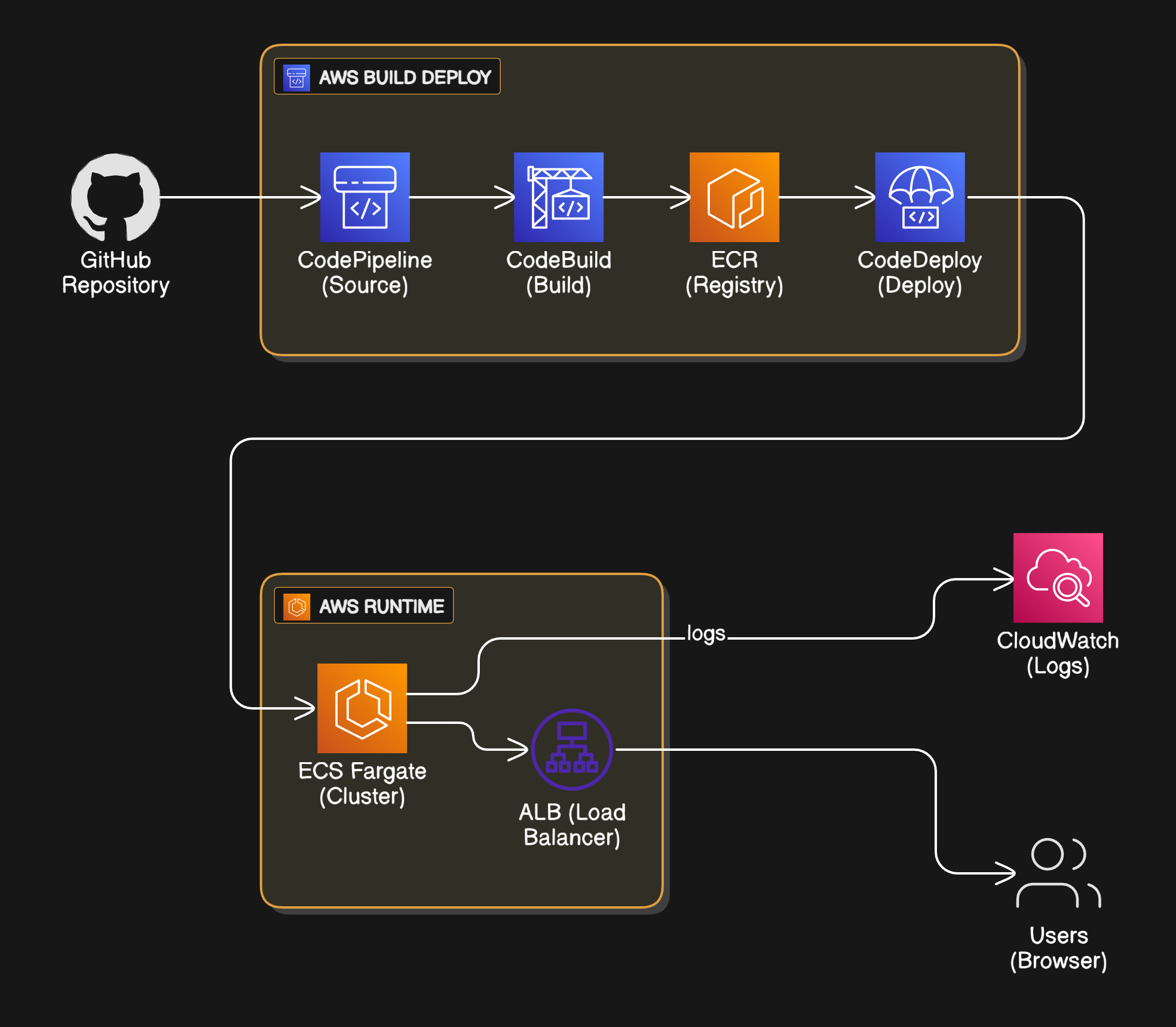
Project Architecture


How It Works

1. Code Push Trigger

Developer → git push → GitHub → Webhook → CodePipeline 

2. Build Phase

CodeBuild executes buildspec.yml:

Pre-build:

  • Login to ECR
  • Set image tag from commit hash

Build:

  • Build Docker image
  • Tag with latest and commit hash

Post-build:

  • Push images to ECR
  • Generate imagedefinitions.json

3. Deployment Phase

ECS rolling deployment:

  1. New task definition created
  2. New tasks started (max 200%)
  3. Health checks validated
  4. Old tasks drained and stopped
  5. Circuit breaker rolls back on failure

4. Traffic Routing

User → ALB (Port 80) → Target Group → ECS Tasks (Port 3000) 

Health checks run every 30 seconds. Unhealthy tasks are replaced automatically.

5. Auto-scaling

CPU-based: Target 70% utilization

Memory-based: Target 80% utilization

Range: 2-4 tasks

What is Terraform?

Terraform is an Infrastructure as Code (IaC) tool that defines cloud resources using declarative configuration files.

Key Concepts

Declarative Syntax: Define desired state, Terraform determines steps to achieve it

State Management: Tracks all managed resources in terraform.tfstate

Plan and Apply:

  • terraform plan: Preview changes
  • terraform apply: Execute changes
  • terraform destroy : Remove resources

Resource Dependencies: Automatic determination of creation order

Why Terraform?

  1. Version control for infrastructure
  2. Reusable modules
  3. Multi-cloud support
  4. Idempotent operations
  5. Team collaboration

What is Terraform?

Terraform is an Infrastructure as Code (IaC) tool that defines cloud resources using declarative configuration files.

Key Concepts

Declarative Syntax: Define desired state, Terraform determines steps to achieve it

State Management: Tracks all managed resources in terraform.tfstate

Plan and Apply:

  • terraform plan: Preview changes
  • terraform apply: Execute changes
  • terraform destroy : Remove resources

Resource Dependencies: Automatic determination of creation order

Why Terraform?

  1. Version control for infrastructure
  2. Reusable modules
  3. Multi-cloud support
  4. Idempotent operations
  5. Team collaboration

Terraform Files Explained

main.tf 

Configures AWS provider and fetches data sources:

provider "aws" {
region = var.aws_region
}

data "aws_caller_identity" "current" {}
data "aws_availability_zones" "available" {}
variables.tf 
Defines input variables:
  • aws_region: Default "us-east-1"
  • project_name: Default "aws-devops"
  • github_repo: Default "Amitabh-DevOps/aws-devops"
  • container_cpu: Default 256
  • container_memory: Default 512
  • desired_count: Default 2
  • vpc_cidr: Default "10.0.0.0/16"
  • github_token: Create and Use your own
vpc.tf 
Creates network infrastructure:
  1. VPC: 10.0.0.0/16 with DNS support
  2. Internet Gateway: Public internet access
  3. Public Subnets: 2 subnets across AZs
  4. Private Subnets: 2 subnets across AZs
  5. NAT Gateways: 2 for high availability
  6. Route Tables: Public and private routing
  7. Security Groups:
    • ALB: Port 80 from the internet
    • ECS: Port 3000 from ALB only
ecr.tf 
Creates Docker registry:
  1. ECR Repository: aws-devops-app
    • Image scanning enabled
    • AES256 encryption
  2. Lifecycle Policy:
    • Keep the last 10 tagged images
    • Remove untagged after 7 days   
ecs.tf 
Creates container orchestration:
  1. ECS Cluster: Container Insights enabled
  2. CloudWatch Log Group: 7-day retention
  3. Task Definition:
    • 256 CPU, 512 MB memory
    • awsvpc network mode
    • Health check configuration
  4. Application Load Balancer: Internet-facing
  5. Target Group: Port 3000, /health checks
  6. ALB Listener: Port 80 HTTP
  7. ECS Service:
    • 2 tasks, Fargate launch type
    • Private subnets, no public IP
    • Circuit breaker enabled
  8. Auto-scaling: 2-4 tasks, CPU and memory policies
iam.tf 
Creates IAM roles:
  1. ECS Execution Role: Pull images, write logs
  2. ECS Task Role: Application permissions
  3. CodeBuild Role: Build and push images
  4. CodePipeline Role: Orchestrate pipeline
All roles follow the least privilege principle. 
codebuild.tf 
Creates build infrastructure:
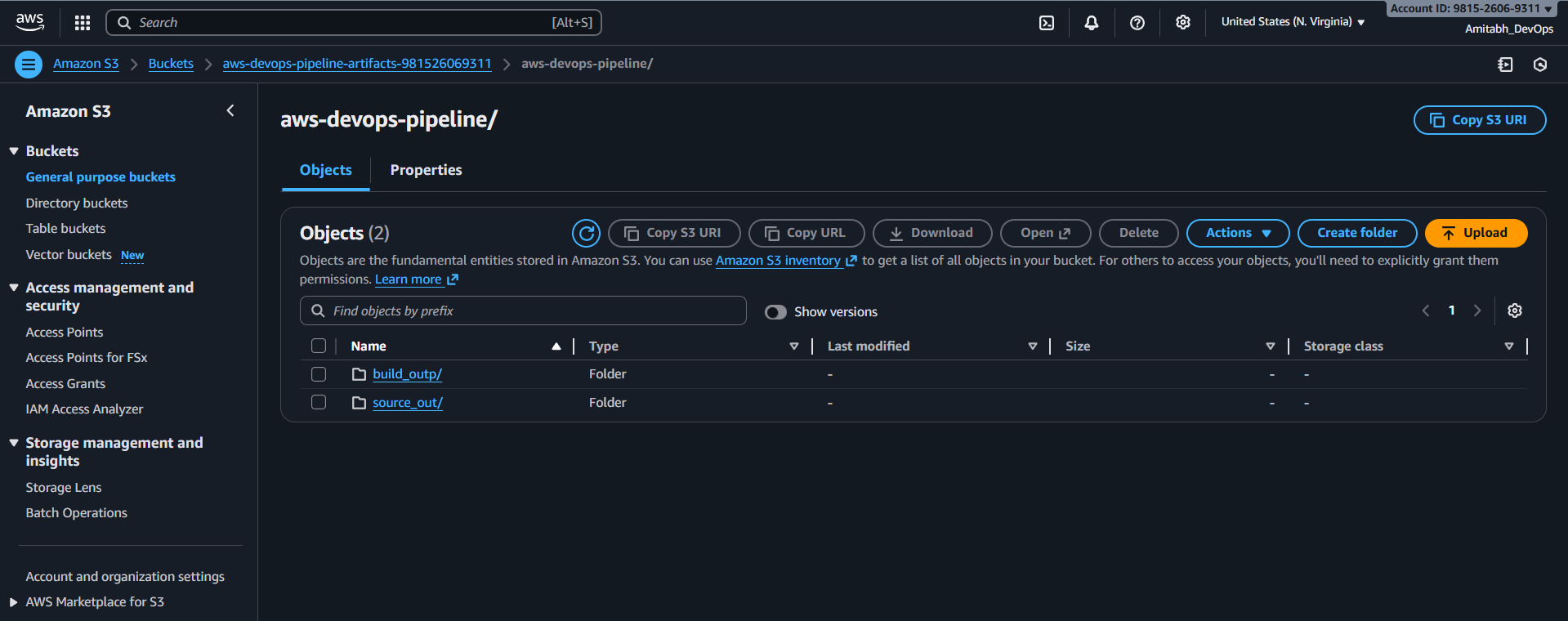
  1. S3 Bucket: Stores artifacts (30-day lifecycle)
  2. CloudWatch Log Group: Build logs
  3. CodeBuild Project:
    • Source: GitHub
    • Environment: aws/codebuild/standard:7.0
    • Buildspec: app/buildspec.yml
    • Cache: npm and node_modules
codepipeline.tf 
Creates CI/CD pipeline: 
Stage 1 - Source: GitHub webhook integration 
Stage 2 - Build: CodeBuild execution 
Stage - Deploy: ECS service update 

outputs.tf 

Displays after deployment:
  • VPC and subnet IDs
  • ECR repository URL
  • ECS cluster and service names
  • ALB DNS name and URL
  • CodePipeline console URL
  • S3 artifacts bucket
  • CloudWatch log groups

Application Structure 

The app/ directory contains:

  • Node.js application code
  • Dockerfile for containerization
  • buildspec.yml for CodeBuild
  • package.json with dependencies
The application is a simple Express.js server with health check endpoint and static file serving.

Deployment Flow 

Initial Deployment

# navigate to terraform directory
cd terraform

# Copy the terraform.tfvars.example file into terraform.tfvars and replace with your actual variables.
cp terraform.tfvars.example terraform.tfvars

# Initialize Terraform
terraform init

# Validate configuration
terraform validate

# Preview changes
terraform plan

# Apply configuration
terraform apply --auto-approve
Deployment takes 5-10 minutes and creates 47 AWS resources. 

Subsequent Deployments

# Make code changes
git add .
git commit -m "Update feature"
git push origin main
Pipeline automatically:
  1. Detects push via webhook (PAT token required for this)
  2. Builds Docker image
  3. Pushes to ECR
  4. Updates the ECS service
  5. Performs zero-downtime deployment

Monitoring 

CloudWatch Logs

  • /ecs/aws-devops: Application logs
  • /aws/codebuild/aws-devops-build: Build logs
Retention: 7 days 

Container Insights 

Enabled on the ECS cluster for:

  • CPU and memory utilisation
  • Network metrics
  • Task count
Health Checks 

Application: /health endpoint returns 200 OK 

Container: Docker health check every 30s 

Load Balancer: Target group health check every 30s 

Destroy Infrastructure end-to-end using:

terraform destory --auto-approve 

Lessons Learned

  1. Infrastructure as Code is Essential: Manual changes lead to drift
  2. Multi-stage Builds Reduce Image Size: ~150 MB vs ~1 GB
  3. Health Checks Enable Self-Healing: Automatic task replacement
  4. Auto-scaling Prevents Outages: Handle traffic spikes gracefully
  5. Use AWS Public ECR: Avoid Docker Hub rate limits
  6. Implement Circuit Breakers: Prevent bad deployments

Conclusion 

This project demonstrates a production-ready CI/CD pipeline on AWS with:

  • 47 AWS resources managed as Terraform code
  • Multi-AZ deployment for high availability
  • Auto-scaling based on demand
  • Zero-downtime deployments
  • Comprehensive monitoring and logging
  • Security best practices
The architecture follows AWS Well-Architected Framework principles. 

Repository: https://github.com/Amitabh-DevOps/aws-devops 

Happy Learning!

LinkedIn

Amitabh Soni
DevOps Engineer at TrainWithShubham